Replicating PostgreSQL To ClickHouse With WalShadow Part 1 - WalShadow Open Source

This is part one of a three part series: part one (this article) · part two: performance and operational comparison with PeerDB and Debezium · part three: the fully managed stack on ClickHouse Cloud (coming soon).
This is the first part of a three part series on replicating data from PostgreSQL to ClickHouse with WalShadow, an open source engine that replicates data from Postgres to ClickHouse directly from the physical WAL.
In this part we explain what WalShadow is and why it is built differently from the CDC tools you probably already know. Then we walk through running the open source version against a PostgreSQL 18 database with a million rows, including updates, deletes and schema changes. In part two we compare its performance and its handling of schema changes with PeerDB and Debezium on Kafka. In part three we use fully managed versions of the entire stack on ClickHouse Cloud: Postgres, WalShadow replication and a ClickHouse service.
Why Would I Use WalShadow When There Are Already So Many CDC Tools?
There are already many ways to sync data from PostgreSQL to ClickHouse. PeerDB, and ClickPipes, which is ClickHouse's managed version of it, have been used in production for a couple of years. Debezium with Kafka is the default choice when other systems also need the changes. So it is fair to ask why ClickHouse built another one.
The answer is that the existing tools all use the same foundation, PostgreSQL logical replication, and three of its limits keep turning up in production:
- Decoding runs on the Postgres server. The walsender decodes every change inside PostgreSQL. Logical replication can use 10 to 25% of the CPU, and even more when tables with large TOASTed values need
REPLICA IDENTITY FULL. - DDL is not in the stream. Logical replication carries row changes, not schema changes. Every logical tool must infer a schema change from what the rows look like, or ignore it. That is where most silent data problems come from, which we measure in part two.
- It is single threaded. Each replication slot is decoded by a single process, which puts a ceiling on how many changes per second can be replicated: roughly 10,000 to 30,000 at most. The same ceiling limits how quickly a pipeline can catch up after a failure.
WalShadow avoids all three by reading the physical WAL instead. In our own tests WalShadow had much better performance; part two has the details.
That does not make WalShadow the right choice everywhere. It needs a physical replication connection, which managed services such as RDS, Aurora and Cloud SQL do not offer to external consumers. It writes only to ClickHouse, so it cannot feed other systems the way Kafka can. And it is an early v0.1 preview, so expect it to keep evolving quickly.
What WalShadow Does Differently
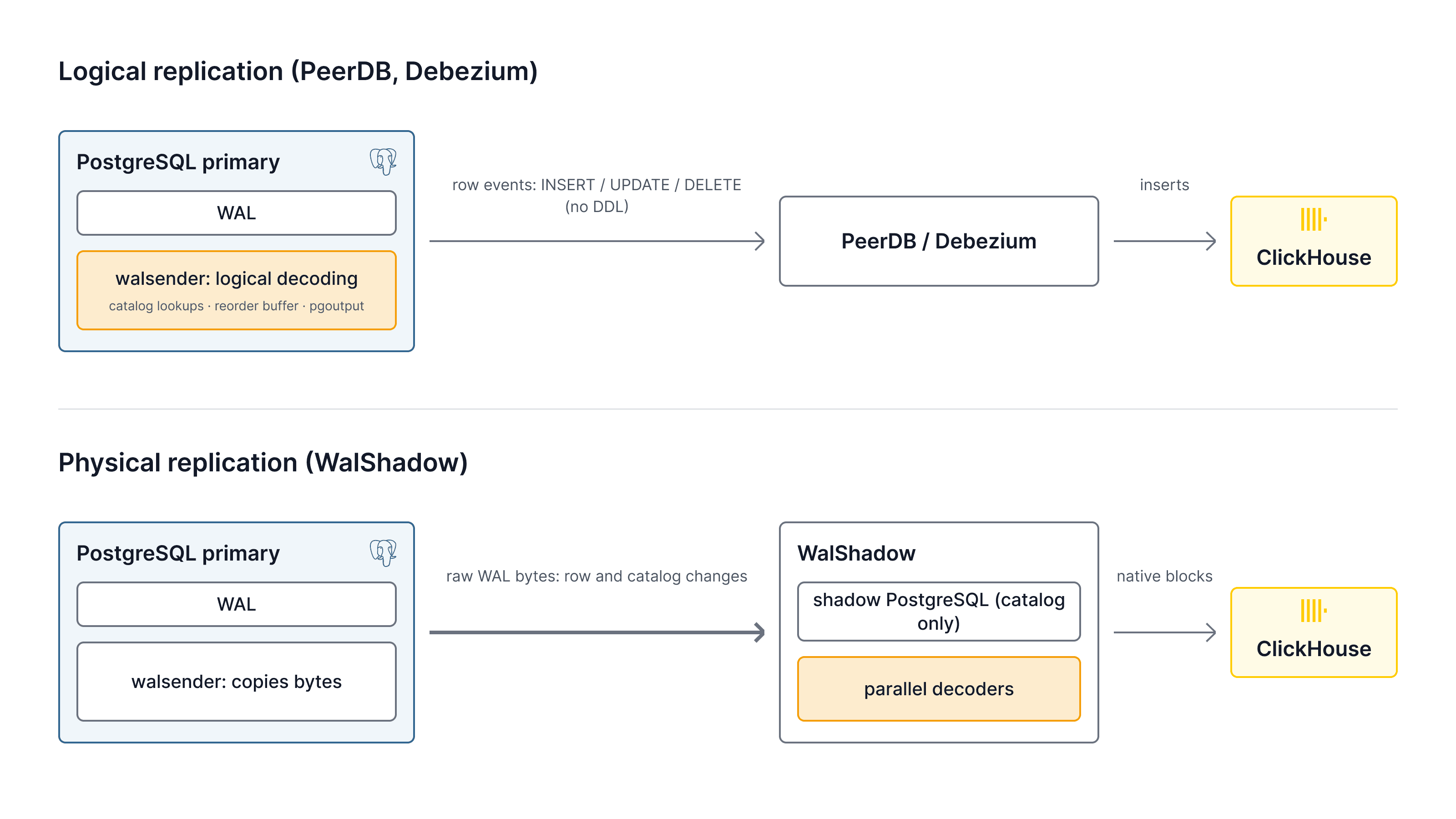
PeerDB and Debezium connect through a logical replication slot. PostgreSQL decodes its write ahead log (WAL) into row level INSERT, UPDATE and DELETE events for the tables in a publication, and the tool turns those events into ClickHouse inserts.
That decoding is real work, and it all happens on the database server. For each replication slot, a walsender process reads the WAL back, looks up every record's table and column definitions in the system catalog, and reassembles the changes per transaction in a reorder buffer, which spills to disk when a transaction is large. Only at COMMIT does the output plugin (pgoutput) turn them into row messages and send them. All of this competes with your application for CPU, memory and disk on the primary, and it is repeated for every slot, so two pipelines mean two decoders.
WalShadow connects like a physical standby. It receives the raw WAL bytes for the whole cluster and does all the decoding itself, outside PostgreSQL, in one process. It replays the catalog part of the WAL into a small, schema only "shadow" PostgreSQL, so that it always knows the schema that applied to every record. It then decodes the heap records in parallel and writes native ClickHouse blocks straight into ReplacingMergeTree tables that it creates and alters itself.
Figure 1 shows the same WAL, but a different place for the work: logical replication decodes on the Postgres primary, WalShadow decodes on its own machine.
Self Managed vs Fully Managed
There are two ways to run WalShadow.
Self managed. You run the open source daemon yourself, as one container per PostgreSQL instance, deployed next to a database that you control at the replication level. It can write to self hosted ClickHouse or to ClickHouse Cloud over the native protocol. This is what this article covers.
Fully managed. ClickHouse Cloud offers Managed Postgres, an NVMe backed PostgreSQL service. Its "Sync to ClickHouse" feature offers two replication methods: ClickPipes (PeerDB, logical replication) and WalShadow. The WalShadow option is in private preview. You pick a destination ClickHouse Cloud service, the database and tables, and whether you want an initial load, CDC or both. The pricing page says replication from Managed Postgres to ClickHouse is free with either method. Managed Postgres on AWS was in public beta and, according to the pricing page, is generally available from 9 November 2026. On GCP it is in private preview.
Physical vs Logical Replication
This difference explains WalShadow's strengths and its limits.
What the primary sends. With logical replication, the primary sends decoded row changes, and only for the tables in a publication. With physical replication, it sends the raw WAL bytes for every database and every table in the cluster, exactly as they were written to disk.
Who decodes. Logical replication decodes on the primary, in a walsender process, once for every slot. Physical replication leaves decoding to the consumer: WalShadow does it on its own machine, so the primary only copies bytes it has already written.
DDL. The logical stream carries rows, not schema changes, so logical tools infer DDL from the shape of the rows or ignore it. In the physical stream DDL is just another catalog change, so WalShadow receives it in order, between the rows it affects.
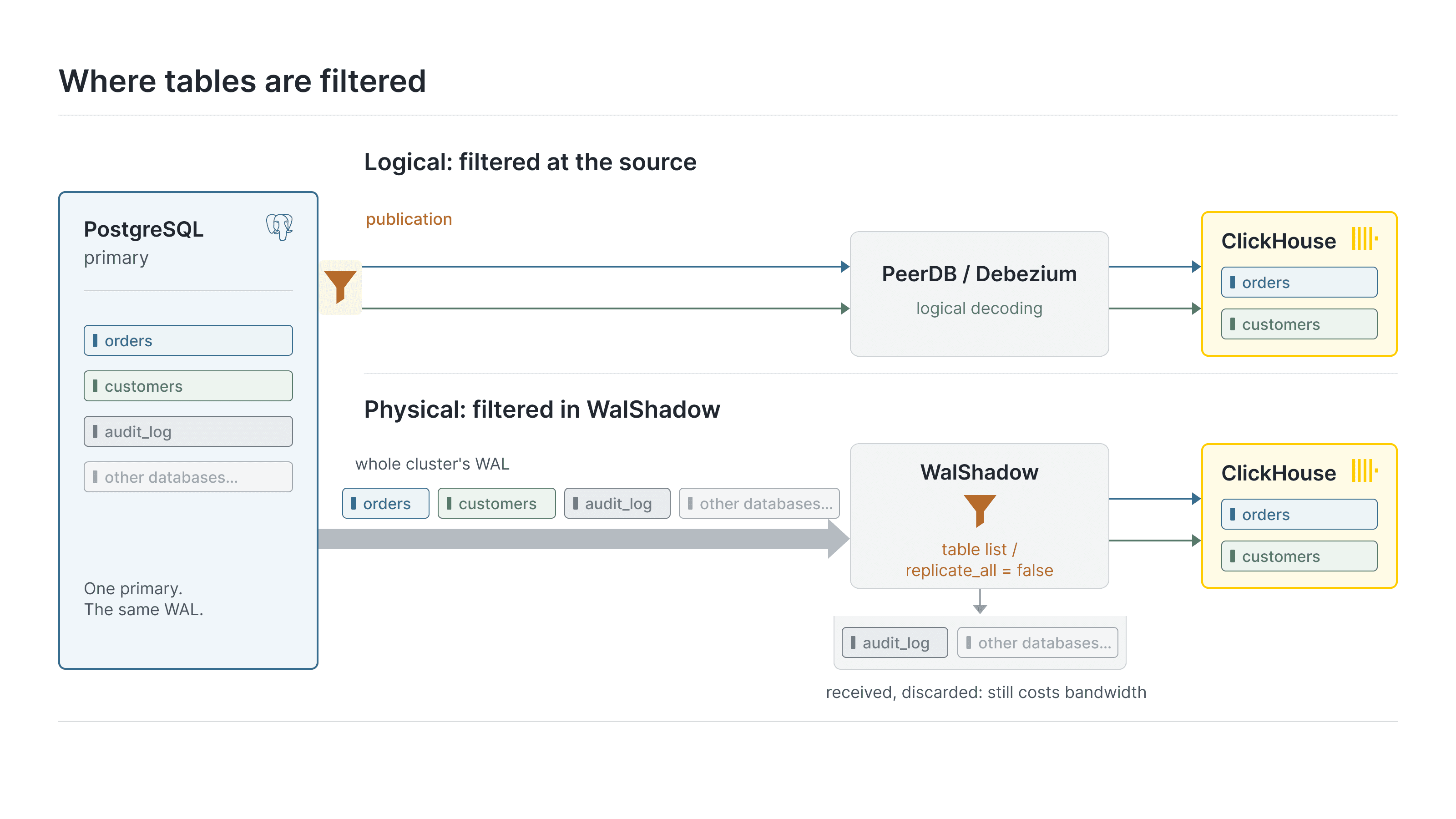
Physical replication has one built in disadvantage: it is all or nothing. PostgreSQL cannot send a subset of tables over a physical connection, in any version, so the primary ships the WAL of the whole cluster. WalShadow filters on its own side, so you still choose which tables reach ClickHouse. That is useful when you do not want a full copy of your Postgres database in ClickHouse. The filtering saves nothing on the source, though. When we wrote 200,000 rows into a table WalShadow did not replicate, it still received 100.1% of the 124 MiB of WAL that write produced. Nothing reached ClickHouse, but the bandwidth was spent. This is inherent to physical replication rather than a WalShadow limitation, and it is worth knowing when sizing the network between the two.
Physical replication also does not reduce WAL volume. WalShadow needs wal_level = logical for the extra key and catalog information in the WAL, so the primary writes the same WAL as it would for PeerDB. The real saving is the decoding work: the walsender uses significantly less CPU than it does for logical replication. Part two has the numbers.
Core Concepts
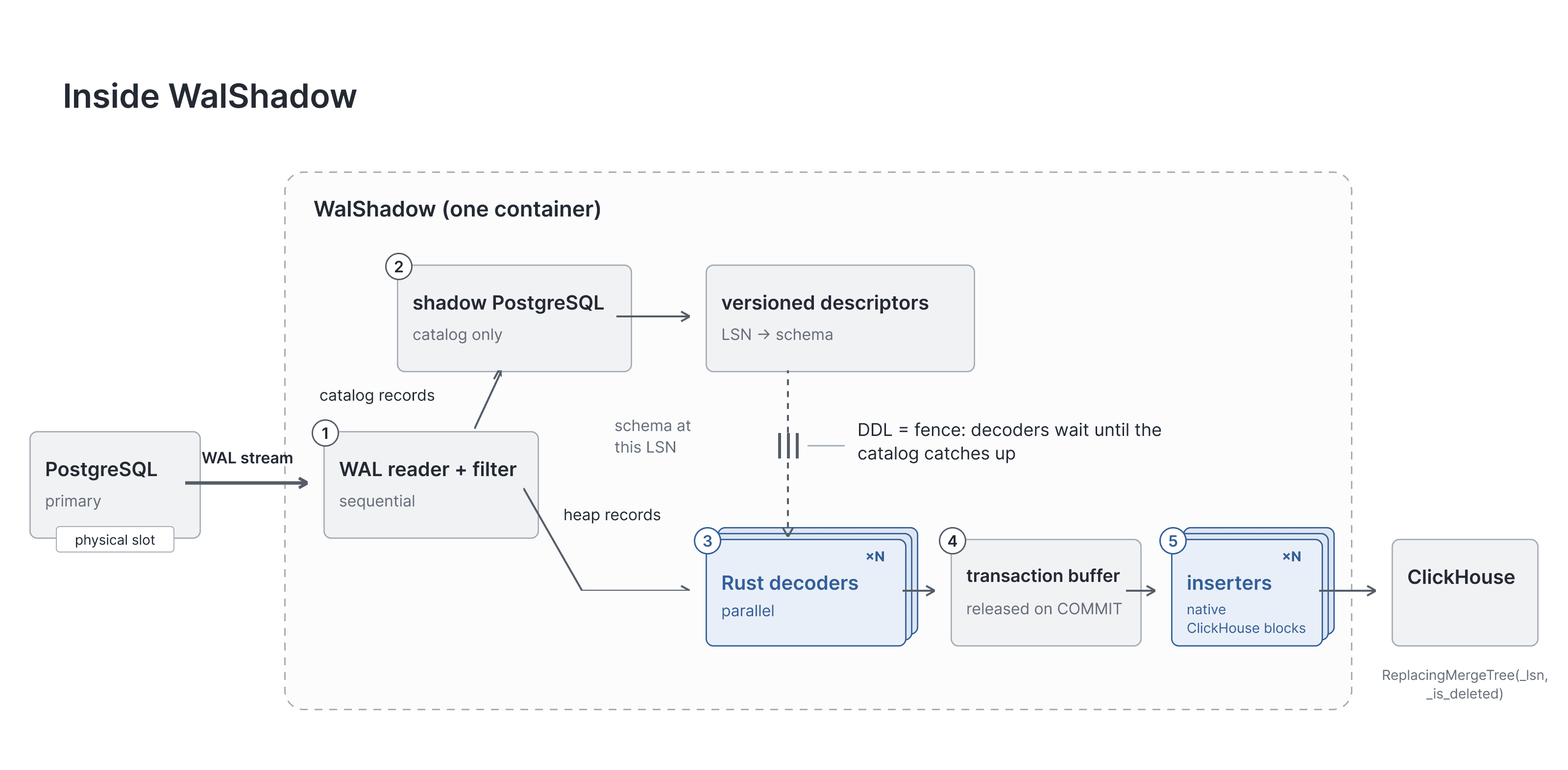
As we have said several times already, WalShadow is a physical replication client. It reads the WAL through a physical replication slot, which keeps WAL on the primary until WalShadow has processed it, using a role with the REPLICATION attribute and read access to every table for the initial load. In the open source version all of this runs in a single container, so from the outside it can look like a black box. Underneath, it works like this.
A sequential WAL reader splits the stream in two. Catalog records go to the shadow PostgreSQL, a real PostgreSQL instance that holds only the catalog and no table data, kept current by ordinary streaming replication. Next to it, WalShadow keeps version descriptors: a timeline that maps each WAL position (LSN) to the catalog state at that point. This internal catalog is what covers DDL. A heap record carries only a relation identifier and raw tuple bytes, so WalShadow decodes each record with the schema that applied when it was written. A schema change acts as a fence: later records wait until the catalog has caught up.
Walkthrough
In this section we set up WalShadow from scratch and replicate a test table, step by step. We assume you already have PostgreSQL and ClickHouse running, and Docker installed on the machine that will run WalShadow. We ran everything on one machine with PostgreSQL 18 and ClickHouse 26.9.
Deploying WalShadow
There is no published image yet, so we build one from the repository with the same major version as your source:
git clone --recurse-submodules https://github.com/ClickHouse/walshadow.git
cd walshadow
docker build -f docker/Dockerfile --build-arg PG_MAJOR=18 -t walshadow:pg18 .
On an existing PostgreSQL server, the source needs wal_level = logical, which requires a restart of the service.
ALTER SYSTEM SET wal_level = logical;
For physical replication to work, WalShadow needs a role with the REPLICATION attribute that can also read every table, including the TOAST heaps, for the initial load. We create the physical slot up front:
CREATE ROLE walshadow LOGIN REPLICATION PASSWORD 'walshadow';
GRANT pg_read_all_data TO walshadow;
SELECT pg_create_physical_replication_slot('walshadow');
Next, allow the replication connection in pg_hba.conf and reload PostgreSQL with SELECT pg_reload_conf();.
host replication walshadow 0.0.0.0/0 scram-sha-256
On the ClickHouse side, WalShadow writes as its own user. That user needs permission to create its database, to create and alter tables as the source schema changes, to truncate and drop them when the source does, and to insert and read rows:
CREATE USER cdc_writer IDENTIFIED BY 'secret';
GRANT CREATE DATABASE, CREATE TABLE, ALTER TABLE, DROP TABLE, TRUNCATE, INSERT, SELECT ON walshadow.* TO cdc_writer;
Use the WalShadow repository's docker/docker-compose.yml with one line added for the restart policy. The daemon exits when ClickHouse is unreachable for a while and relies on being restarted, so without this line the pipeline stays down after a ClickHouse restart. With it, recovery is automatic. Change the environment variables in the compose file to connect to your Postgres and ClickHouse.
name: walshadow
services:
  walshadow:
    image: walshadow:pg18
    restart: unless-stopped
    environment:
      RUST_LOG: warn,walshadow=info
      WALSHADOW_PG_URL: postgres://walshadow:walshadow@postgres:5432/app?sslmode=disable&slot=walshadow
      WALSHADOW_CH_URL: clickhouse://cdc_writer:secret@clickhouse:9000/walshadow
      WALSHADOW_XACT_BUFFER_MAX: "268435456"
    ports: ["29484:9484"]
    volumes:
      - walshadow-data:/var/lib/walshadow
      - walshadow-config:/etc/walshadow

volumes:
  walshadow-data:
  walshadow-config:
Creating Test Data In PostgreSQL
We used an orders table similar to the one in the PeerDB series that this one follows, with one extra nullable notes column:
CREATE TABLE orders (
    order_id SERIAL PRIMARY KEY,
    customer_id INT NOT NULL,
    order_date TIMESTAMP DEFAULT CURRENT_TIMESTAMP,
    status VARCHAR(50) DEFAULT 'Pending',
    total_amount NUMERIC(10, 2) NOT NULL,
    shipping_address TEXT NOT NULL,
    payment_method VARCHAR(50) NOT NULL,
    notes TEXT,
    shipping_date TIMESTAMP,
    delivery_date TIMESTAMP,
    created_at TIMESTAMP DEFAULT CURRENT_TIMESTAMP,
    updated_at TIMESTAMP DEFAULT CURRENT_TIMESTAMP
);
WalShadow uses the primary key as the ORDER BY of the ClickHouse ReplacingMergeTree table.
Generating Test Data
One million rows, with about 10% NULL notes and a mix of NULL shipping and delivery dates, so that the verification later has something to catch:
SELECT setseed(0.42);
INSERT INTO orders (customer_id, order_date, status, total_amount, shipping_address,
                    payment_method, notes, shipping_date, delivery_date)
SELECT
    (random() * 100000)::int + 1,
    now() - (random() * interval '365 days'),
    (ARRAY['Pending','Shipped','Completed','Cancelled'])[floor(random() * 4)::int + 1],
    round((random() * 1000)::numeric, 2),
    'Street ' || g || ', Prague',
    (ARRAY['Card','PayPal','Bank Transfer'])[floor(random() * 3)::int + 1],
    CASE WHEN random() < 0.1 THEN NULL ELSE 'note ' || g END,
    CASE WHEN random() < 0.7 THEN now() - (random() * interval '300 days') END,
    CASE WHEN random() < 0.5 THEN now() - (random() * interval '200 days') END
FROM generate_series(1, 1000000) AS g;
Configuring WalShadow
WalShadow comes with an init command that prepares the first configuration. It checks that both PostgreSQL and ClickHouse are reachable and set up correctly, creates the destination database in ClickHouse, and writes a ch-config.toml file with one block per table to replicate. The daemon reads that file when it starts.
You need init once per deployment, not on every start. Later, WalShadow resumes from the saved state.
docker compose run --rm walshadow init --all-tables
The ch-config.toml has a few sections:
[source]- The PostgreSQL connection, password included.[ch]- The ClickHouse connection and how WalShadow writes data.flush_timeout_msdefaults to 1000; 100 gives around 130 ms latency at the cost of more ClickHouse CPU.[stream]- Not written byinit. Becauseinitwrites no[stream]block, every table created later is replicated too by default.[table.<schema>.<table>]- One block per table. Here it is possible to configure column rules for a given table.
Initial Replication
docker compose up walshadow
After this, a new table should be created in ClickHouse, walshadow.public_orders. If not, investigate the walshadow container logs and look for any errors.
WalShadow writes into ReplacingMergeTree(_lsn, _is_deleted) tables. _lsn serves as the version, and the row with the highest _lsn replaces all earlier versions. _is_deleted marks deletes as tombstones. ClickHouse collapses old versions only during background merges, so query with FINAL to always see the current state.
To look at or change a running daemon, use the ctl command. It is a subcommand of the same walshadow-stream binary which is run inside the container:
docker compose exec walshadow walshadow-stream ctl status     # progress and lag_bytes
docker compose exec walshadow walshadow-stream ctl show       # effective config
Testing Changes
To test the pipeline, try a few typical changes on the orders table and check each one in ClickHouse. With default settings WalShadow flushes once a second (flush_timeout_ms: 1000).
1. Insert new rows:
INSERT INTO orders (customer_id, status, total_amount, shipping_address, payment_method)
SELECT (random() * 100000)::int + 1, 'Pending', round((random() * 1000)::numeric, 2), 'Street ' || g || ', Brno', 'Card'
FROM generate_series(1, 5000) AS g;
2. Update a row. ClickHouse receives a new version of the row with a higher _lsn. Without FINAL you see every version. With FINAL you see only the latest one, Cancelled.
UPDATE orders SET status = 'Cancelled', updated_at = now() WHERE order_id = 3;
3. Delete a row. This also arrives as a new version, with _is_deleted = true, and under FINAL the row disappears. Configure soft_delete = true in the [ch] section of ch-config.toml if you want to keep the tombstones.
DELETE FROM orders WHERE order_id = 3;
4. Add a column with a default. The new column premium_customer appeared in ClickHouse as Nullable(Bool), and the million existing rows show false, as they do in PostgreSQL.
ALTER TABLE orders ADD COLUMN premium_customer BOOLEAN DEFAULT false;
5. Rename a column. The ClickHouse column is renamed too, with the old values under the new name. No second column is added.
ALTER TABLE orders RENAME COLUMN payment_method TO payment_type;
6. Widen a type. The column became Decimal(14, 2), and a value that does not fit the old Decimal(10, 2) arrived intact.
ALTER TABLE orders ALTER COLUMN total_amount TYPE NUMERIC(14, 2);
INSERT INTO orders (customer_id, total_amount, shipping_address, payment_type)
VALUES (44, 123456789.99, 'Street 3, Ostrava', 'Card');
7. Drop a column. The column is removed from the ClickHouse table as well.
ALTER TABLE orders DROP COLUMN notes;
Conclusion
WalShadow takes a different route from every other PostgreSQL CDC tool. It reads the physical WAL, keeps its own copy of the catalog and decodes off the Postgres server. In the walkthrough that gave us a million rows in ClickHouse from a single container, with correct types and every value matching the source. It also handled an added column, a rename, a type change, a dropped column and other schema evolution.
For a self hosted PostgreSQL that feeds only ClickHouse, we think it is already the better design. It runs as one container with one physical slot and does no decoding on the PostgreSQL server. It also handles more schema changes seamlessly than other CDC replication tools, and we go through them in part two.
In the next article we compare it with PeerDB and Debezium on Kafka: latency, CPU, recovery, multiple schema changes and a lot of everyday operations, each checked value by value.
Written by
Lukáš Kozelnický
ClickHouse Engineer, New Cadence
We are an independent ClickHouse consultancy. We help businesses deploy ClickHouse open source and ClickHouse Cloud, build solutions on top of ClickHouse for real-time analytics, observability and AI, and resolve performance and reliability issues with their existing deployments.
Related insights

Replicating PostgreSQL To ClickHouse With WalShadow Part 2 - Performance And Operational Comparison Of WalShadow, PeerDB And Debezium
18 min read

Who ClickHouse Competes With (and Who It Doesn't)
11 min read
How To Evaluate The TCO of ClickHouse
5 min read