Replicating PostgreSQL To ClickHouse With WalShadow Part 2 - Performance And Operational Comparison Of WalShadow, PeerDB And Debezium

This is part two of a three part series: part one: WalShadow open source · part two (this article) · part three: the fully managed stack on ClickHouse Cloud (coming soon).
In part one we explained why and how WalShadow reads the physical WAL, and walked through running the open source container against PostgreSQL with a practical example.
In this article we compare WalShadow with the two tools that use logical replication and are the popular ways to replicate data from PostgreSQL to ClickHouse: PeerDB, which is also what ClickPipes (ClickHouse's managed solution) runs, and Debezium with Kafka. All three ran from the same PostgreSQL into the same ClickHouse. We also measured recovery speed after failures.
In summary, WalShadow's physical replication was much cheaper on resources and faster to run. But the real differences show up from an operational perspective, in the tests for schema changes, large values and edge cases.
Testing Environment
Everything ran in Docker on one AWS m6a.large instance (2 vCPU, 8 GB RAM). We tested with PostgreSQL 18 and ClickHouse 26.9.
We tested several scenarios and workloads.
- Initial load: an initial load of the
orderstable with 500,000 rows with different data types plus a big text value field that is TOASTed on PostgreSQL. No live traffic during this test. - Live traffic replication: 50 transactions per second, each with 40 rows (24 inserts, 12 updates, 4 deletes). That makes 1,200 inserts, 600 updates and 200 deletes per second, and about 120,000 rows in total.
- Latency probe (runs during the live traffic replication test): one insert every 250 ms into a separate table, with ClickHouse polled every 20 ms.
- Burst test: 1,000,000 inserts in 10 transactions, with no other traffic running.
- Failure scenarios: the replicator stopped for 60 s under load, ClickHouse stopped for 60 s under load, and the replicator SIGKILLed 10 s into a 20 s load. Every replicator ran under
restart: unless-stopped. - It is important to note that correctness was checked on values, not on row counts. After each window a verifier compared every column of every row against ClickHouse
FINAL, counting missing, extra and mismatched rows asbad_rows.
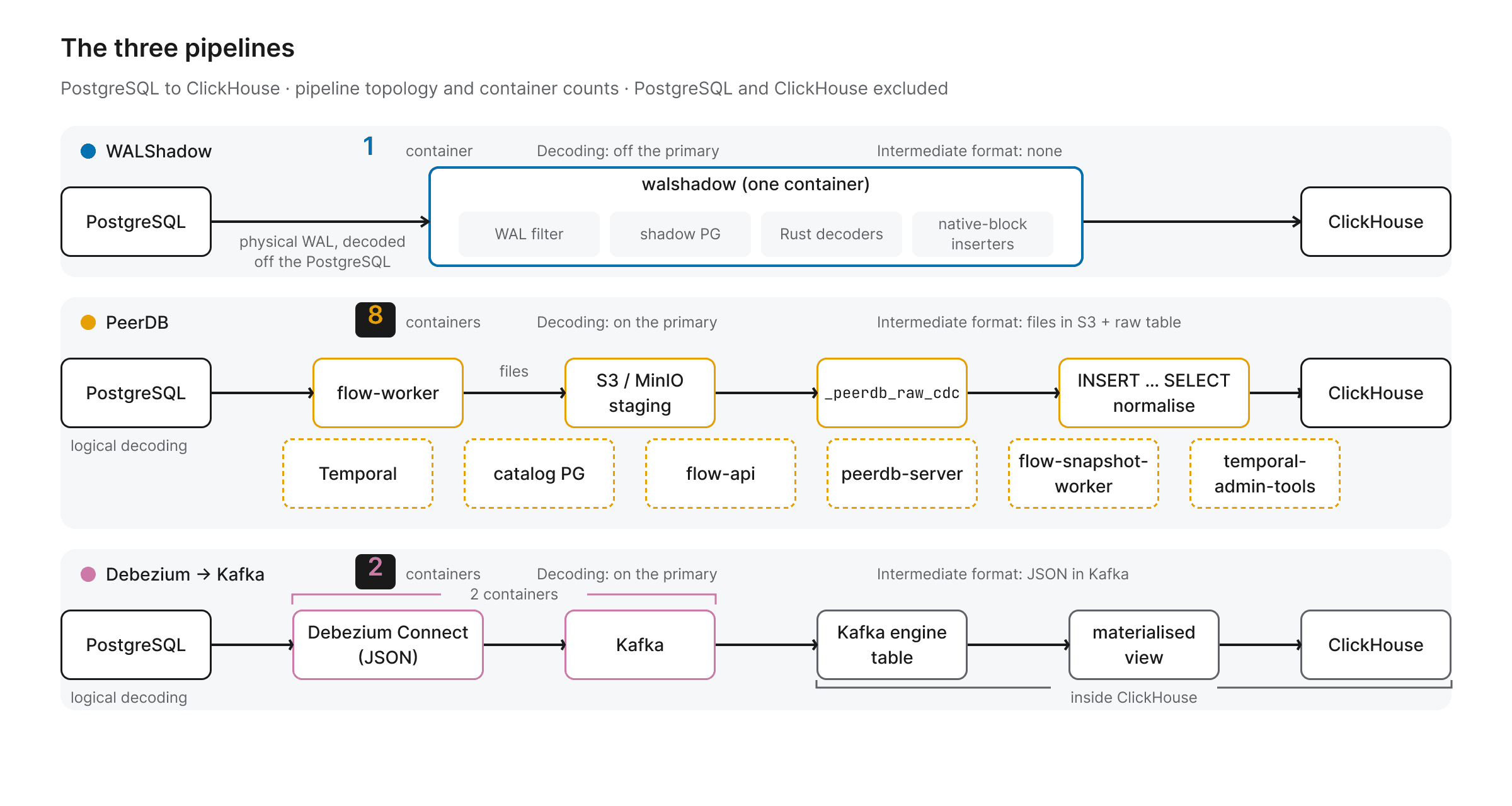
Figure 1. The three replication pipelines from PostgreSQL to ClickHouse.
Throughput, Latency And Cost Results
Every tool ran the prepared scenarios and workloads one after another, on the same VM. The measurements are:
- Latency (p50 / p99): the time from a row's commit in PostgreSQL until it is visible in ClickHouse. We measured it with the default settings and again with tuned settings (explained below the table).
- Replicator CPU: the replication tool itself (for Kafka with Debezium it is Connect plus Kafka).
- Source walsender CPU: the CPU used by the PostgreSQL process that sends changes to the replication tool (the walsender).
- ClickHouse CPU: ClickHouse's own load.
- WAL generated: what PostgreSQL wrote for the same load.
- Burst visible: the total time from the start of the first commit until all 1M rows are in ClickHouse. After PG commit: the last part of that time, after PostgreSQL had finished its last commit. It shows how far behind the source the tool still was when the source finished.
- Replicator RSS: the tool's memory after the burst.
- Containers: a property of the deployment, not of a workload.
All CPU figures are averages over the 60 s, in % of one vCPU core.
| Measurement | Workload | WalShadow | PeerDB | Debezium → Kafka |
|---|---|---|---|---|
| Initial load | 500k row snapshot | 20.0 s | 26.5 s | 59.6 s |
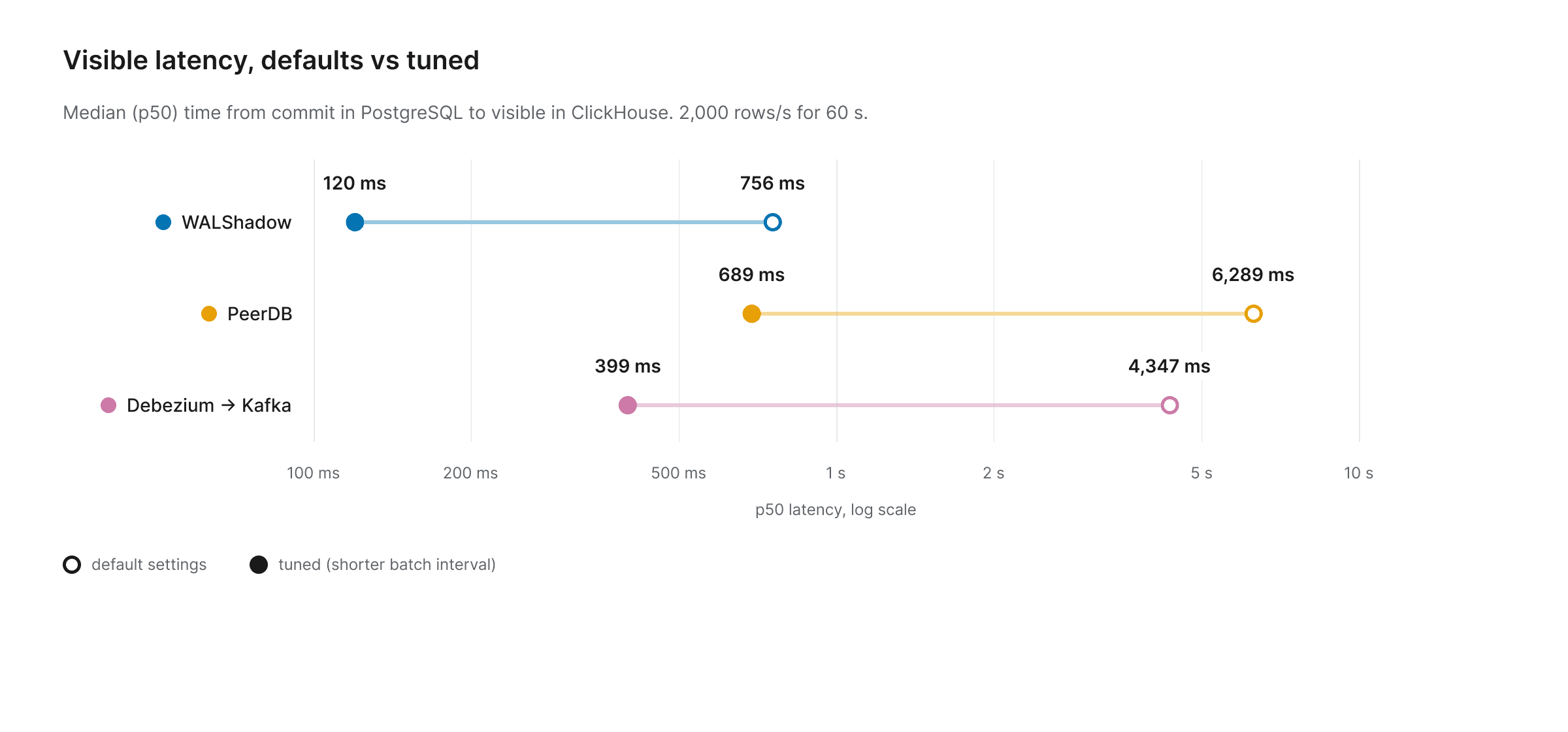
| Live traffic latency p50 / p99, defaults | 2,000 rows/s, 60 s | 756 / 1,034 ms | 6,289 / 16,116 ms | 4,347 / 8,174 ms |
| Live traffic latency p50 / p99, tuned | 2,000 rows/s, 60 s | 120 / 140 ms | 689 / 1,283 ms | 399 / 787 ms |
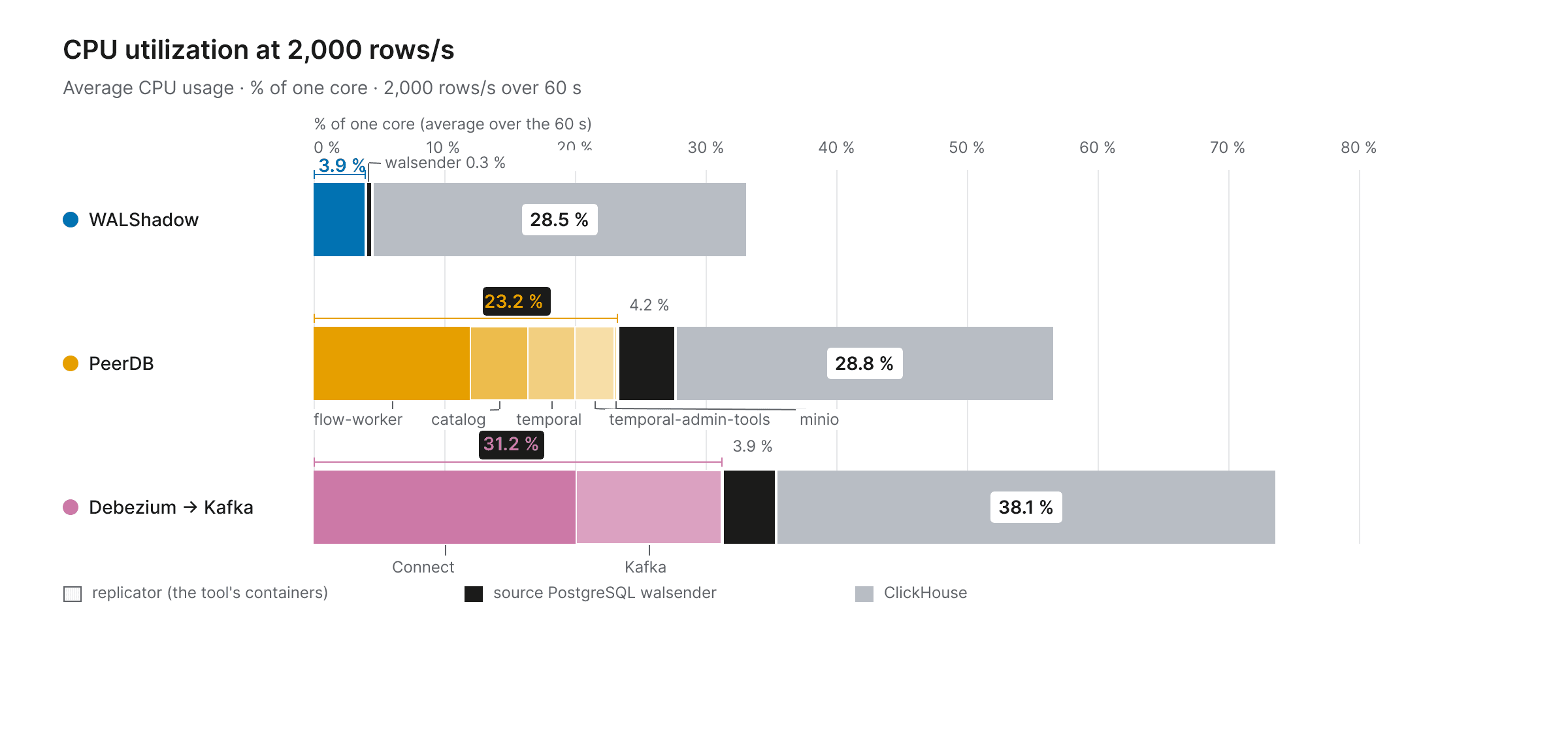
| Replicator CPU, % of one core | 2,000 rows/s, 60 s | 3.9 | 23.2 | 31.2 (Connect 20.1 + Kafka 11.1) |
| Source walsender CPU, % of one core | 2,000 rows/s, 60 s | 0.3 | 4.2 | 3.9 |
| ClickHouse CPU, % of one core | 2,000 rows/s, 60 s | 28.5 | 28.8 | 38.1 |
| WAL generated | 2,000 rows/s, 60 s | 33.9 MB | 33.9 MB | 35.3 MB |
| Burst visible | 1M rows, 10 transactions | 8.8 s | 36.8 s | 49.6 s |
| … after PG commit | 1M rows, 10 transactions | 1.9 s | 31.2 s | 44.3 s |
| Replicator RSS after burst | 1M rows, 10 transactions | 359 MiB | 651 MiB | 1,251 MiB |
| Containers | n/a | 1 | 8 | 2 |
What "tuned" means. Every tool collects changes into batches before it writes to ClickHouse, and the batch interval impacts its latency. Tuning lowered that one setting and nothing else:
- WalShadow:
flush_timeout_msfrom 1,000 to 100 ms. - PeerDB:
sync_intervalfrom 10 s to 1 s. - Kafka with Debezium: Debezium polls PostgreSQL every 100 ms (
poll.interval.ms, default 500 ms), and the ClickHouse Kafka engine flushes every 500 ms (kafka_flush_interval_ms, default 7.5 s).
Figure 2. CPU at 2,000 rows/s, % of one core.
Three things stand out from the performance results:
Default latency reflects batching rather than architecture. With default settings, each p50 is below the tool's own batch interval. Once tuned, WalShadow reached 120 ms p50. But this latency is not free. For a real production workload it makes more sense to leave the WalShadow defaults, because creating a lot of small parts in ClickHouse can cause more problems than the lower latency is worth.
The burst test is where the architecture shows its benefit for WalShadow. WalShadow had all one million rows visible 1.9 seconds after the last PostgreSQL commit, 8.8 seconds end to end. PeerDB needed 36.8 seconds and Debezium 49.6 seconds end to end.
WAL volume is the same for all three. What differs is the walsender, which used only 0.3% of a core for WalShadow compared to 3.9% to 4.2% when it runs logical decoding for PeerDB or Debezium.
Figure 3. Median latency at the 2,000 rows/s workload.
Why WalShadow Beats The Other Tools On Performance
The performance difference is the part that is really caused by physical versus logical replication. A logical walsender on PostgreSQL decodes every change, holds it until commit and runs an output plugin. In physical replication the walsender copies bytes that PostgreSQL already wrote.
Each of the tested tools has a different design:
- WalShadow decodes heap tuples in parallel Rust decoders, and builds native ClickHouse blocks in one process. There is no intermediate format.
- PeerDB pulls changes, stages batches as files in S3, loads them into a raw table, and then normalises them into the destination with
INSERT … SELECT. Orchestration runs on Temporal. - Debezium serialises each change to JSON, Kafka stores it, and ClickHouse parses it again through a Kafka engine table and a materialised view into the target table.
Schema Changes And Other Operations
This is the part we were most curious about, because this is where CDC pipelines in general tend to drift without anyone noticing. A tool that mishandles an operation rarely stops. It keeps running with wrong data in ClickHouse. We tested 34 cases in three different groups for each tool, as much to understand the boundaries of each design as to score them.
- 21 DDL schema changes: changes to the structure of a table that is already being replicated.
- 8 daily operations: ordinary traffic with upserts, savepoints and updates of rows that hold large values.
- 5 other operational cases: maintenance and utility commands.
Each case used its own small table, created before the pipeline started. We applied the change, wrote a few rows, and compared every column with ClickHouse FINAL, waiting up to 90 s for schema changes and 45 s for everyday operations.
Large values (TOAST) show up in several of the tested cases. In PostgreSQL, when a value is larger than 2 KB it is not stored in the table row but in a separate TOAST table. The original row keeps only a pointer to it. The table's replica identity configuration determines how replication tools handle this.
In the tables below, bold marks a case where the destination ended up different from the source while the pipeline kept running without reporting it.
DDL Schema Changes
We tested 21 structural DDL changes made on PostgreSQL and how the changes propagated to ClickHouse. For some tests we recorded convergence times.
| # | PostgreSQL change | WalShadow | PeerDB | Debezium → Kafka |
|---|---|---|---|---|
| 1 | CREATE TABLE after start | exact, 1.1 s | not replicated | not replicated |
| 2 | ADD COLUMN c text | exact, 1.1 s | exact, 10.3 s | column never appears |
| 3 | ADD COLUMN c int NOT NULL DEFAULT 42 | exact (old rows show 42), 1.1 s | exact, 10.2 s | column never appears |
| 4 | RENAME COLUMN s TO s2 | exact, 1.1 s | s2 added as a new column, old rows NULL in it, s frozen | s2 never appears, s NULL for new rows |
| 5 | DROP COLUMN b | exact (column dropped), 1.1 s | source columns exact, stale b kept | source columns exact, stale b kept |
| 6 | ALTER COLUMN a TYPE bigint | exact (column becomes Int64), 1.4 s | 2^40 stored as 0 (column stays Int32) | 2^40 stored as NULL |
| 7 | ALTER COLUMN s TYPE int USING s::int | exact (column becomes Nullable(Int32)), 1.7 s | values match, column stays String | values match, column stays String |
| 8 | ALTER COLUMN s DROP NOT NULL | exact (column becomes Nullable), 1.1 s | NULL stored as '' | exact (only because our hand written DDL was Nullable up front) |
| 9 | TRUNCATE | exact (applied in source order), 1.1 s | ignored, 3 stale rows remain | ignored, 3 stale rows remain |
| 10 | ALTER TABLE … RENAME TO …_new | later rows not yet replicated (no warning logged) | rows keep flowing (correct) | rows go to a new topic nothing consumes |
| 11 | ALTER COLUMN id TYPE bigint on the primary key | id 4294967296 stored as 0 (with or without a stop and supervisor restart) | id 4294967296 stored as 0 | id 4294967296 stored as 0 |
| 12 | SET NOT NULL after backfilling | exact | exact | exact |
| 13 | DROP NOT NULL, then NULL values | exact | NULL stored as '' | exact (only because our hand written DDL was Nullable up front) |
| 14 | varchar(10) → varchar(100) | exact | exact | exact |
| 15 | numeric(6,2) → numeric(14,4) (rewrite) | exact | 1234567890.1234 stored as NULL | exact (only because our DDL used Decimal(38,10) up front) |
| 16 | ALTER TYPE enum ADD VALUE, then use it | exact | exact | exact |
| 17 | Table with a GENERATED ALWAYS AS … STORED column | exact | generated column NULL for rows changed by CDC | generated column NULL for rows changed by CDC |
| 18 | ADD COLUMN … GENERATED ALWAYS AS … STORED | exact | column never appears | column never appears |
| 19 | New partition, DETACH PARTITION, writes to the detached table | detached rows stay in the root's destination; the detached table gets only later rows | detached rows stay; the detached table is not replicated | only the initial load reaches the root's table; every later change goes to a per partition topic nothing consumes |
| 20 | ALTER TABLE … SET SCHEMA other | later rows not yet replicated (same as a rename) | rows keep flowing | later rows go to a new topic nothing consumes |
| 21 | SET UNLOGGED, write, SET LOGGED, write | exact | not applicable: PostgreSQL refuses SET UNLOGGED on a published table | rows written while unlogged never arrive (PostgreSQL allows SET UNLOGGED here, because Debezium's publication is FOR ALL TABLES) |
| Exact with no operator action | 17 of 21 | 9 of 21 (1 not applicable) | 8 of 21 |
We did not test DROP TABLE because what happens to the destination is a policy setting. All three keep the ClickHouse table by default.
WalShadow's four misses have a pattern: they are the cases where a table changes its identity (a rename, a move to another schema, a detached partition) or where the primary key changes type, which the v0.1 preview does not yet track. The primary key case caught all three tools. None of these are inherent to the physical approach, since the catalog change is right there in the WAL, so we expect them to be straightforward to close as the project matures. We are sharing the test cases and results with the WalShadow team so they can be turned into fixes and regression tests.
What Each Tool Does With DDL
WalShadow applies DDL itself in stream order. A CREATE or ALTER TABLE is a catalog change in the WAL, so it arrives between the rows exactly where it happened. Rows before it land in the old shape and rows after it in the new one.
PeerDB propagates only added columns. Everything else is not propagated by design, and the change becomes visible after the next sync interval.
Debezium does not propagate anything. The DDL on the ClickHouse side needs to be written manually. There is a setting, input_format_skip_unknown_fields: when 1, a new field disappears silently; when 0, the Kafka engine stops consuming at the first unknown field instead.
Daily Operations
Schema changes are relatively rare, but everyday operations like those in this test happen on every production database. When a CDC tool mishandles one, it usually does not stop. It keeps running and leaves ClickHouse with wrong or missing data.
| Operation | WalShadow | PeerDB (two settings) | Debezium → Kafka |
|---|---|---|---|
INSERT … ON CONFLICT DO UPDATE / DO NOTHING | exact | exact | exact |
SAVEPOINT + ROLLBACK TO in a committed transaction | exact | exact | exact |
DELETE parent with ON DELETE CASCADE | exact | exact | exact |
UPDATE parent key with ON UPDATE CASCADE | exact | exact | exact |
UPDATE … SET id = … (primary key change) | exact | exact | exact |
| Large value written and updated in the same transaction (default replica identity) | exact | exact | __debezium_unavailable_value |
UPDATE leaving an older large value untouched (default replica identity) | exact | NULL | __debezium_unavailable_value |
The same UPDATE, after REPLICA IDENTITY FULL is switched on | exact | exact | exact |
| Total | 8 exact | 7 exact, 1 silently wrong | 6 exact, 2 silently wrong |
The PeerDB column was run with two non default settings that fix some of its failures. Both settings below are off by default. The tests "UPDATE with ON UPDATE CASCADE", "primary key change" and "large value written and updated in the same transaction" are exact only because of these settings.
PEERDB_CLICKHOUSE_ENABLE_PRIMARY_UPDATE=true, which fixed the primary key update and the update cascade. However, ClickPipes (managed PeerDB on ClickHouse Cloud) considers this setting experimental and not recommended for production.PEERDB_CLICKHOUSE_CDC_STORE_ENABLED=true, which fixed the large value written and updated in the same transaction.
Kafka with Debezium uses the same manually written ClickHouse DDL and materialised views as the schema matrix, created once when the pipeline started, so it is only as exact as that DDL.
Other Operational Cases
These are maintenance and utility commands that run less often, but that every production database meets sooner or later. PeerDB ran with both settings off for these cases.
| Operation | WalShadow | PeerDB | Debezium → Kafka |
|---|---|---|---|
TRUNCATE parent CASCADE | exact on both tables | ignored on both tables (3 + 6 stale rows) | ignored on both tables (3 + 6 stale rows) |
CREATE INDEX CONCURRENTLY + REINDEX | exact | exact | exact |
DELETE half the table + VACUUM FULL, then DML | exact | exact | exact |
CLUSTER … USING, then DML | exact | exact | exact |
REFRESH MATERIALIZED VIEW | replicated as a keyless table, with a duplicate row after refresh | not replicated (logical replication does not carry views) | not replicated (logical replication does not carry views) |
| Total | 4 exact, 1 silently wrong | 3 exact, 1 silently wrong, 1 not applicable | 3 exact, 1 silently wrong, 1 not applicable |
The materialised view case is an interesting one. Because WalShadow reads the physical WAL it can see the view's storage, which logical replication cannot, so it is the only tool that replicates it at all. The refresh is a full rewrite in PostgreSQL, and in the preview that arrives as a second copy of the rows rather than a replacement. It is another case we have passed on to the WalShadow team.
Recovery
Any component in the pipeline can fail for many reasons, so measuring robustness and recovery time is important.
| Failure scenario | WalShadow | PeerDB | Debezium → Kafka |
|---|---|---|---|
| Replicator stopped 60 s: catch up | 36.6 s | 40.9 s | 106.2 s |
| ClickHouse stopped 60 s: catch up | 46.6 s | 157.6 s | 40.7 s |
| Replicator SIGKILL: catch up | 35.0 s | 269.8 s | 98.3 s |
| Slot retained after the replicator was down 60 s | 202 MB | 198 MB | 226 MB |
| Slot retained after ClickHouse was down 60 s | 168 MB | 367 MB | 378 MB |
| Raw / live row versions after SIGKILL | 2,357,735 / 1,700,808 | 1,857,314 / 1,700,808 | 1,874,469 / 1,700,808 |
| Kafka stopped 60 s: catch up, defaults | n/a | n/a | 76.5 s, and 368.9 s in another run |
Same, scheduled.rebalance.max.delay.ms=0 | n/a | n/a | 76.8 s |
Every drill on every tool ended with bad_rows = 0. No tool lost data. The only differences are in recovery time.
Figure 4. Recovery time after each failure scenario.
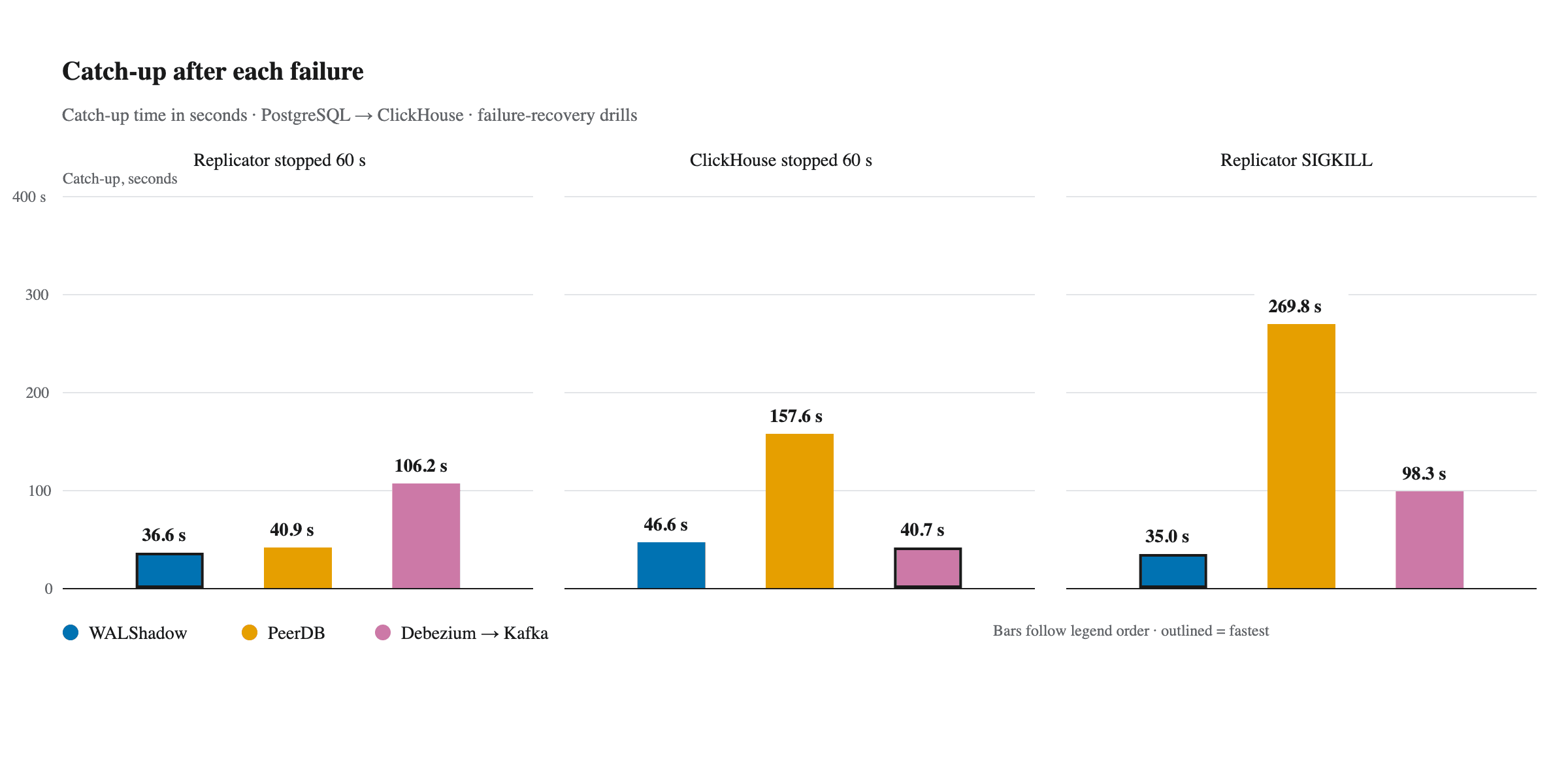
WalShadow recovered in under a minute in every failure scenario. One operational note: the container exits roughly 40 to 50 s after ClickHouse becomes unreachable and relies on being restarted, so run it under a restart policy, which is the one line we added to the compose file in part one. With that in place recovery was fully automatic.
Conclusion
Under steady load all three tools were correct. WalShadow was the cheapest on resources by a wide margin, as it is only one container and about 4% of a core at a steady 2,000 rows/s. A million row burst finished less than two seconds behind the source commit. Its real advantage is schema handling. It applied 29 of 34 cases exactly, with no operator action: 17 of 21 DDL changes, all 8 daily operations and 4 of 5 other operational cases. For PeerDB and Debezium, schema change is the main ongoing operational cost. The handful of cases WalShadow does not yet cover are well defined, and we have shared them with the WalShadow team.
There are still things in the other tools' favour that matter: PeerDB's maturity and managed availability, and Kafka's fan out and replay.
In part three we move to ClickHouse Cloud, where ClickHouse runs managed WalShadow against its own Managed Postgres. We run it next to a ClickPipe on the same instance, so both see exactly the same writes.
Written by
Lukáš Kozelnický
ClickHouse Engineer, New Cadence
We are an independent ClickHouse consultancy. We help businesses deploy ClickHouse open source and ClickHouse Cloud, build solutions on top of ClickHouse for real-time analytics, observability and AI, and resolve performance and reliability issues with their existing deployments.